For power users
Automation & API
Spiralyst Lab is scriptable. Every on-screen control has a programmatic twin, so a script, a MIDI/OSC bridge, an AI agent, or an automated QA harness can drive what the app shows and read what it hears — in real time, without faking mouse clicks.
Local only. The automation surface runs entirely on your Mac — no remote control, no telemetry, nothing leaves your machine.
This page documents the creative subset of the surface: read and set the whole scene, switch fractals and wire reactivity, inspect the live audio, run Auto-Reactivity, run a show fullscreen, save presets, drive the 3D Flows, and export stills and video. It ends with a short recipe for recording a demo video of your own.
Who it's for
- Power users who want to script setups and batch-export art.
- DJs & VJs bridging a MIDI or OSC controller to colors, motion, and fractal parameters.
- AI agents that read the live audio and current look, decide what should happen next, and apply it.
- QA & measurement: drive a known scene, render, read pixels + audio + state, and grade against a baseline.
How to drive it
Two paths into the same surface — the HTTP API for code (any language, any tool) and a set of reference Claude Code skills we publish here for anyone who wants a ready-to-install agent integration.
HTTP — http://127.0.0.1:<port>/api/*
The app's embedded localhost server. Drive it from any language — curl, a
Python script, a Node process, a MIDI/OSC bridge, an AI agent. Dozens of endpoints
across state, UI, window, presets, 3D Flows, audio, and export. Changes apply within one ~250 ms poll
tick.
Localhost-only, with a per-launch bearer
token — by design. The server binds 127.0.0.1 on an OS-assigned port,
and every request needs a secret token that's regenerated every time the app launches. The
port + token are written to a private file in your home folder, readable only by you — so
only software running as you can find them and call the API. Same model
Jupyter
and VS Code use. It is not a remote-control surface — don't expose it off the machine.
Read the port + token (written to ~/.spiralyst-lab/api-port.json at launch)
# the file lives at ~/.spiralyst-lab/api-port.json — 0600, user-only:
#   { "url": "http://127.0.0.1:54321", "port": 54321, "token": "…", "version": "3.3.0", … }
P=~/.spiralyst-lab/api-port.json
BASE=$(jq -r .url "$P")
AUTH="Authorization: Bearer $(jq -r .token "$P")"
Both the port and the token rotate on every launch — re-read the file each run, don't hard-code either. The same two values are also shown in-app under About ▸ Spiralyst Lab with Copy buttons, for when a human wants to grab them without opening a file.
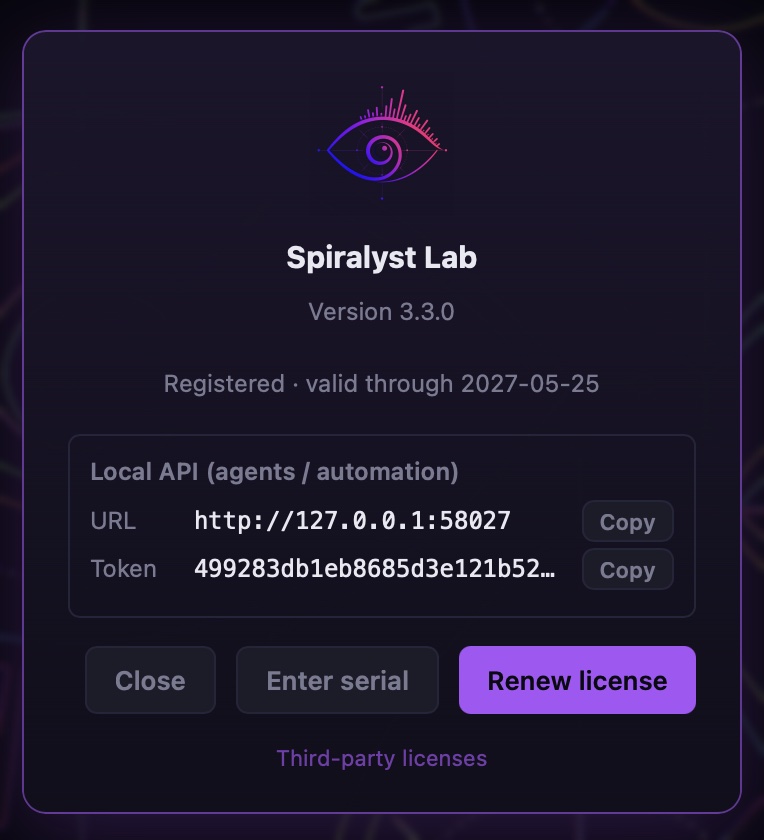
~/.spiralyst-lab/api-port.json on every launch — pick whichever path
your workflow prefers.
Quickstart
A complete drive-and-capture loop over HTTP: read the port + token, fetch the scene, switch fractal + enable audio, wait a tick, export a 4K still, and read where it landed.
# 1. read $BASE and $AUTH (see above) — one jq line each from ~/.spiralyst-lab/api-port.json

# 2. read the current scene
curl -s -H "$AUTH" "$BASE/api/state" | jq '{ type, hueStart: .color.hueStart }'

# 3. switch fractal + enable system audio
curl -s -H "$AUTH" -XPOST "$BASE/api/state/apply" -H 'Content-Type: application/json' \
  -d '{"type":"fractal-phyllotaxis","audio":{"enabled":true,"source":"system"}}'

# 4. wait ~0.3s for the JS poll to apply
sleep 0.3

# 5. export a 4K still
curl -s -H "$AUTH" -XPOST "$BASE/api/export/png" -H 'Content-Type: application/json' -d '{"res":"4K"}'

# 6. read where it was written
curl -s -H "$AUTH" "$BASE/api/export/png" | jq '.path'   # → ~/.spiralyst-lab/qa/<file>.png
Every request needs the Authorization: Bearer … header
— a request without the right token returns 401 Unauthorized.
Reference — creative subset
Path · method · purpose · params, with the window.__spiral.*
equivalent. This is the creative subset only; see Full reference
for advanced/agent endpoints.
State
| Endpoint | Purpose | Params | JS equivalent |
|---|---|---|---|
| GET /api/state | Last pushed scene snapshot (or null at boot before the first push). | — | __spiral.state.get() |
| POST /api/state/apply | Apply a full scene snapshot, or a partial that merges over the live scene (within ~250 ms). A partial of numbers only — a camera angle, a colour, a slider value — is set in place without rebuilding anything else (v3.7.0). | snapshot blob, full or partial (JSON body) | __spiral.state.set(snap) / .patch(partial) |
| POST /api/state/undo | Step back in history. | — | __spiral.undo() |
| POST /api/state/redo | Step forward in history. | — | __spiral.redo() |
| GET /api/state/stack | { undo, redo, canUndo, canRedo } | — | __spiral.stack() |
UI
| Endpoint | Purpose | Params | JS equivalent |
|---|---|---|---|
| POST /api/state/tab | Switch the sidebar tab. | { name: "source" | "visual" | "camera" | "export" } | __spiral.ui.tab(name) |
| POST /api/state/scroll | Scroll a control into view (auto-activates its tab). | { target: "color:hueStart" } | __spiral.ui.scrollTo(target) |
Audio
| Endpoint | Purpose | Params | JS equivalent |
|---|---|---|---|
| GET /api/audio/snapshot | Latest audio-input frame: { source, active, peak, rms, spectrum[32], pitchHz, ... } — the values the artwork reacts to. | — | __spiral.audio.snapshot() |
| GET /api/audio/bands | Live per-reactive-slider levels (incl. saturated / lowDynamics flags) — see whether a band is maxed out or barely moving. | — | — |
| POST /api/audio/heal | Run Auto-Reactivity (AGC). Runs in-app over a few seconds; poll GET /api/audio/heal for the report. Needs music playing. | { policy?, keys?, targetPeak? } | await __spiral.audio.heal({ policy: "auto" }) |
Export
| Endpoint | Purpose | Params | JS equivalent |
|---|---|---|---|
| POST /api/export/png | Render the active viewport to a PNG (exact pixels, not a screen grab). Writes to ~/.spiralyst-lab/qa/. | { res: "4K" | "1440p" | "1080p" | "720p" } or { w, h, ppi } | await __spiral.export.png({ res: "4K" }) |
| GET /api/export/png | The last export report: { path, w, h, ppi, bytes } — poll after the POST. | — | — |
| POST /api/export/video | Record a video of the art without opening the Export tab. Video only, no audio track; the recording runs for the length of the clip. | { frames, fps, bitMbps, res: "4K" … "360p" | "native", format: "mp4" | "mov" | "webm", name } — all optional | — |
| GET /api/export/video | The last video report: { path, bytes, frames, fps } — poll after the POST. | — | — |
Output location. Exported PNGs and videos
are written to ~/.spiralyst-lab/qa/. The POST starts the export; the
matching GET returns the report with the path once it lands. Exports need a
license, just as in the Export tab.
Window & presentation
Run the show from a script: the art fullscreen for the room, the control panel pinned in the shot for a tutorial, or the panel on its own window for a projector.
| Endpoint | Purpose | Params | JS equivalent |
|---|---|---|---|
| POST /api/window/fullscreen | Art fullscreen on or off. Fullscreen hides the control panel, so the audience sees only the art. | { on: true | false } | await __spiral.ui.fullscreen(on) |
| POST /api/window/panel | Pin the control panel on screen while fullscreen — a demo that shows the controls in use — or unpin it for a clean picture. | { pinned: true | false } | __spiral.ui.panel(pinned) |
| GET /api/window/status | Which layout is live: { fullscreen, detached, panelPinned, panelVisible }. | — | __spiral.ui.window() |
| POST /api/window/detach | Move the control panel into its own window — for a second screen or a projector setup. | — | — |
| POST /api/window/reattach | Bring the control panel back into the main window. | — | — |
Presets
| Endpoint | Purpose | Params | JS equivalent |
|---|---|---|---|
| POST /api/presets/save | Save the current scene to your preset library, exactly as the Save button does — ready to load by hand at the gig. A preset with the same name is replaced. | { name: "Ocean opener" } | __spiral.presets.save(name) · __spiral.presets.list() |
3D Flows
| Endpoint | Purpose | Params | JS equivalent |
|---|---|---|---|
| GET /api/flows/status | The active flow's live numbers and its part-by-part truth labels. For the ocean wave: wave heights, wavelength and speed, and on the beach where the wave breaks and which kind of breaker it is. null when the scene isn't a flow. | — | __spiral.flows.status() |
| POST /api/flows/restart | Restart or reseed the active flow (the ↻ button). | — | __spiral.flows.restart() |
| POST /api/flows/react | Switch the flow's React to music set on or off — the 🎵 button: controls, bands and ranges in one go. The ocean wave has one. | { on: true | false } | await __spiral.flows.react(on) |
Examples
From the WebView devtools console — window.__spiral (instant)
__spiral.state.patch({ type: "fractal-phyllotaxis", audio: { enabled: true, source: "system" } });
__spiral.state.patch({ color: { hueStart: 0.9 } });   // set one field → re-renders
__spiral.state.patch({ camera: { yaw: 1.57 } });      // numbers only → set in place, pitch untouched (v3.7.0)
await __spiral.audio.heal({ policy: "auto" });        // tune reactivity to the music
await __spiral.export.png({ res: "4K" });             // → ~/.spiralyst-lab/qa/
Switch a fractal + tune reactivity over HTTP
# enable system audio + phyllotaxis
curl -s -H "$AUTH" -XPOST "$BASE/api/state/apply" -H 'Content-Type: application/json' \
  -d '{"type":"fractal-phyllotaxis","audio":{"enabled":true,"source":"system"}}'

# auto-tune, then poll the report (music must be playing)
curl -s -H "$AUTH" -XPOST "$BASE/api/audio/heal" -H 'Content-Type: application/json' -d '{"policy":"auto"}'
sleep 4
curl -s -H "$AUTH" "$BASE/api/audio/heal" | jq '.healed'
Inspect the live audio (what the artwork hears)
curl -s -H "$AUTH" "$BASE/api/audio/snapshot" | jq '{ peak, rms, pitchHz }'
curl -s -H "$AUTH" "$BASE/api/audio/bands"    | jq '.bands[] | { key, level, saturated, lowDynamics }'
Run the show fullscreen
# clean fullscreen for a venue or a capture — only the art on screen
curl -s -H "$AUTH" -XPOST "$BASE/api/window/fullscreen" -H 'Content-Type: application/json' -d '{"on":true}'
curl -s -H "$AUTH" -XPOST "$BASE/api/window/panel"      -H 'Content-Type: application/json' -d '{"pinned":false}'

# tutorial recording — keep the controls in the shot
curl -s -H "$AUTH" -XPOST "$BASE/api/window/panel"      -H 'Content-Type: application/json' -d '{"pinned":true}'

# check what's live
curl -s -H "$AUTH" "$BASE/api/window/status"   # → { fullscreen, detached, panelPinned, panelVisible }
Ocean wave, riding the music, saved as a preset
# with the ocean wave on screen and the music playing:
curl -s -H "$AUTH" -XPOST "$BASE/api/flows/react"  -H 'Content-Type: application/json' -d '{"on":true}'
curl -s -H "$AUTH" "$BASE/api/flows/status" | jq '{ type, scene, particles, significantHeight }'
curl -s -H "$AUTH" -XPOST "$BASE/api/presets/save" -H 'Content-Type: application/json' -d '{"name":"Ocean opener"}'
Export a 30-second video
curl -s -H "$AUTH" -XPOST "$BASE/api/export/video" -H 'Content-Type: application/json' \
  -d '{"frames":900,"fps":30,"res":"1080p","format":"mp4","name":"ocean-demo"}'
sleep 32   # the recording runs for the length of the clip
curl -s -H "$AUTH" "$BASE/api/export/video" | jq '{ path, bytes, frames, fps }'
Record a demo video of your own
Two ways, depending on what the video is for.
The art on its own — use Export. The Export tab (or
POST /api/export/video from a script) renders the canvas straight to MP4, MOV or
WebM at up to 4K: exact pixels, no screen capture, no desktop in the frame. Exports are
video-only, so add your soundtrack in any video editor afterward, using audio you have the
rights to.
A performance, with the sound and the controls — screen-record it. macOS's screen recorder (Shift-Command-5) or any capture app records the screen. The part that takes setting up is the sound, because macOS doesn't give a screen recorder the system audio on its own. A few tips:
- Route the system audio through a loopback device — for example BlackHole, a free, open-source audio driver; any loopback device works. In Audio MIDI Setup, create a Multi-Output Device that sends to both your speakers or headphones and the loopback device, and choose it as your sound output, so you still hear the music while it records. Then pick the loopback device as the recorder's audio input.
- Set the stage first: art fullscreen, control panel pinned if you want the sliders in the shot, unpinned for a clean picture. An agent can do this for you with the presentation calls above.
- If the soundtrack is a file you have, lay the original file under the video in your editor instead of keeping the recorded sound. A loopback recording can drop bits of audio now and then — you hear a click, and the music slowly runs ahead of the picture. Use the recorded track only to line the original up, then mute it.
Full reference
This page covers the creative subset only. The complete contract — file read/write, save/open dialogs, the calibration suite, and the full 50+ endpoint list for advanced and agent use — lives in the agent-control reference, hosted here for direct read access from agents, scripts, and integrations.
Reference — Claude Code skills
Four reference skills exist for Claude Code
(Anthropic's CLI agent). Claude Code resolves slash commands like /spiral-observe to
a local skill folder under ~/.claude/skills/<name>/; the skill's
SKILL.md tells Claude what the command does and how to drive it.
Not bundled. Spiralyst Lab does not ship these skills, and they are not installed by Claude Code. They are reference examples, published here, demonstrating how to drive the API above. Install them yourself with the steps below, or read them as worked examples and write your own. Nothing about the API is Claude-specific — any agent that can speak HTTP can drive Spiralyst Lab.
/spiral-observe— read the live audio (snapshot, per-band reactivity, full-rate frames), read the scene state, capture a PNG of the rendered viewport, and report what the app is currently doing. [SKILL.md]/spiral-scene— build a scene programmatically from a natural-language description: fractal type + params, effects, layers, background, and wire sliders to audio bands or sine animation, then verify with a screenshot. [SKILL.md]/spiral-calibrate— run the calibration suite (audible by design): play ground-truth tones, grade pitch / gain / beat timing / settings round-trip / visual render against a baseline. [SKILL.md]/spiral-heal— auto-tune (AGC) the audio-reactive bands so sliders stop pinning at max or sitting at zero. Tunes gain, squelch, and signal together. [SKILL.md]
Setup
- Install Claude Code and sign in.
- Create the skills directory if it doesn't exist:
mkdir -p ~/.claude/skills - For each skill, create a folder and drop in a
SKILL.md. Withcurl:
Eachfor name in spiral-observe spiral-scene spiral-calibrate spiral-heal; do mkdir -p ~/.claude/skills/$name curl -fsSL "https://spiralyst.com/skills/$name/SKILL.md" \ -o ~/.claude/skills/$name/SKILL.md doneSKILL.mdis the literal file the agent reads — open the [SKILL.md] links above to inspect the source before you install. - Restart Claude Code. The four slash commands resolve on next session start.
- Launch Spiralyst Lab (the skills drive the app's local HTTP server documented above; if the app isn't running there's nothing to talk to).
Inspect before you install. Each
skill is a single Markdown file with a YAML frontmatter (name,
description) and a body of plain instructions plus shell snippets that call
the public HTTP API documented above. Read the source from the
SKILL.md links next to each skill name —
nothing is obfuscated, and there are no hidden binaries or daemons.
Caveats
- Localhost only. The HTTP server binds
127.0.0.1— it is not a remote-control surface. Don't expose it off the machine. - Latency. HTTP changes apply within one ~250 ms poll tick. The
window.__spiralobject (accessible via the app's WebView devtools console — Develop → Web Inspector → Console) is synchronous and instant; it's documented in the reference table above for developers who want zero-latency control without leaving the app's runtime. - One instance. Drive a single running app instance at a time; the port is per-launch and OS-assigned.
- Exports need a license. PNG and video export over the API follow the same rule as the Export tab. Everything else on this page — the scene, audio, presentation mode, presets, 3D Flows — works in the free trial too, for the types the trial includes.