Blog · Release · v3.8.0 · October 23, 2026
A wind tunnel with your music on the fan
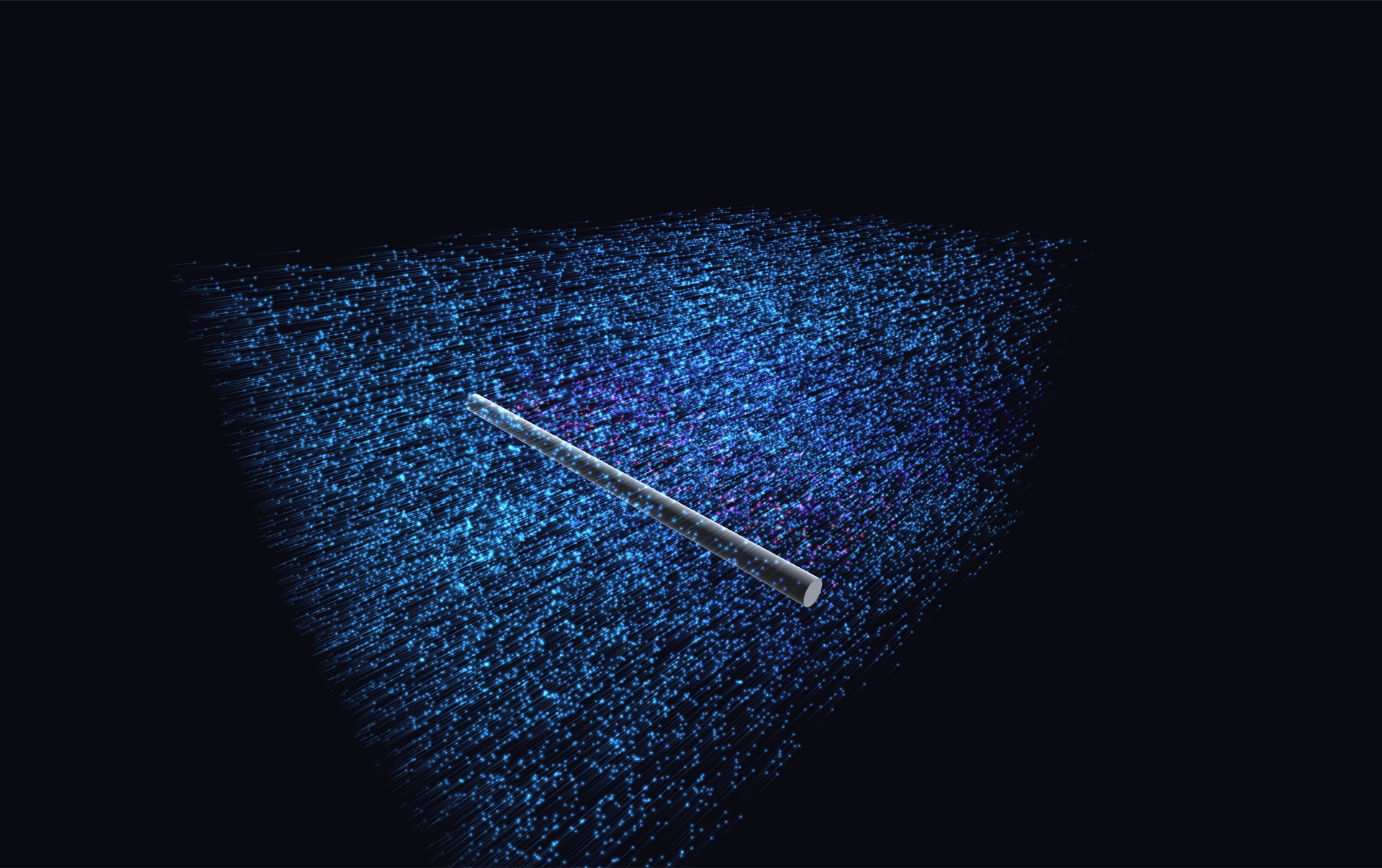
Spiralyst Lab 3.8.0 is out, and 3D Flows has a fourth scene: Wind Flow. It draws air moving through a wind tunnel as glowing smoke, round a body you pick or a model you load. Your music moves the wind. And anyone can try all of it: this release turns the free trial into the whole app on a 20-minute timer.
In this release
- Wind Flow: glowing smoke lanes through four wind tunnels, round a cylinder, a sphere, an oval, a wing section or your own model.
- Your music moves the wind: one click and the bass, the hi-hats and the kicks each get a job.
- Load your own model from an STL or OBJ file. A rubber duck comes built in.
- A trial that opens the whole app: every scene, preset and feature for 20 minutes per launch, with a watermark on the picture. Export needs a licence.
- Scenes that open at once: the wing Wind Flow starts on, and the Floating Ducky preset, ship with their air already worked out.
- A new bundled preset, Pinwheels Forever: Fermat-spiral pinwheels that drift, spin and pulse to your music.
- A loop wave for every animated slider, so a model can turn round and round.
- Math Mode at four reading levels, and under the hood: security hardening of the local agent API, an updated app framework, undo fixes for agent edits, and a default view for each scene.
What Wind Flow is
Real wind tunnels show the air with smoke. A row of small tubes upstream, called a smoke rake, lets out thin lines of smoke. Where the lines squeeze together, the air is fast. Where they spread apart, it is slow.
Wind Flow draws that picture. Tens of thousands of glowing bits each follow the air round a body you choose. You can fill the whole tunnel with them, or let them out from one smoke rake or several.
A shortcut with a famous flaw
At wind tunnel speeds, air hardly squeezes. That lets an old shortcut work well: pretend the air has no friction and does not spin. Then the flow comes from one simple equation, and its answers add up. Add the right simple pieces to a steady wind and you get the flow round a cylinder, an oval or a sphere. In open air, for frictionless air, those three answers are exact.
The shortcut has a famous flaw. It says the air closes up neatly behind the body. Then the body would feel no drag at all. That is called d'Alembert's paradox. Real air does not behave that way. It peels off the back of the body and rolls up into swirls.
So Wind Flow draws the wake on purpose. Behind a cylinder, swirls come off one side and then the other. That row of swirls is called a vortex street. In 1954 Anatol Roshko measured how often the swirls come off a cylinder, and the scene uses his numbers. A sphere sheds loops instead, at a rate measured by Sakamoto and Haniu in 1990. For the other bodies the timing is only illustrative, and the app says so. You can pick the wake's style: Auto, Shedding or Continuous.
The tunnels and the bodies
Pick one of four tunnels:
- Round pipe.
- Rectangular section, a long box.
- Funnel. The tunnel narrows, and the air speeds up by the same ratio as the area shrinks. Squeeze the area to a quarter and the air goes four times as fast.
- Open jet. Air blows out of a nozzle, and the body sits in open air with no walls round it.
Then pick a body: a cylinder, an oval, a wing section, a sphere, your own model, or nothing at all for an empty tunnel. Change its size. Move it with sliders, or drag it with the mouse, and press ⌂ Home to bring it back. Spin the cylinder or the wing. Tip the wing up into the wind with the angle of attack. Past 10 degrees, the scene tells you a real wing would stall. You can also change the wing's thickness and how curved it is.
In any closed tunnel you can add a baffle: a fence plate in front of the body, a model included. Set where it stands, how far it leans and how tall it is. The air speeds up through the gap above it.
Air chop adds gusts. They are smooth noise that never bunches up anywhere. Their strength is set the way engineers rate gustiness, as a turbulence intensity. They are not turbulence.
What is worked out, and how
We want you to know what you are looking at, so the scene keeps track. In open air, the flow round the cylinder, the sphere and the oval is exact for frictionless air. The wing section is worked out another way. Its surface is covered with many small panels, each with a little source or swirl. The app sets their strengths so the air goes round the surface, not through it. Most tunnel walls, the baffle and a loaded model are solved with panels too. The wake is drawn. The gusts are smooth noise.
Every part of the picture carries an honesty label: exact, measured, illustrative or drawn. Scripts and agents can read those labels through the app's automation API. The info bar always shows the wind speed and the words "art, not wind modelling".
Pressure, lift and spin
Engineers also map the pressure on a body. Pressure follows speed: fast air has low pressure. The number for it is called Cp. It is exactly 1 where the air stops on the nose. In the frictionless flow round a cylinder it drops to minus 3 at the sides. Colour the air by Cp and you can see this happen.
You can colour the air by speed, pressure (Cp), swirl, gustiness, the smoke lane it came in on, or its age.
The wing's panels follow one more rule, called the Kutta condition: the air must leave the sharp back edge smoothly. That one rule sets how much air goes round the wing, and so how much lift it makes. Lift is the only force the scene works out. A spinning cylinder gets the ideal swirl for its spin, and a real one carries less. No drag is shown, because this air has none.
Your music moves the wind
Press 🎵 React to music, and one click binds a set made for this scene:
- the bass moves the wind, from half to double the speed you set;
- the hi-hats roughen the air through Air chop;
- the kicks throw bigger swirls into the wake;
- the loudness lifts the brightness;
- and on the cylinder and the wing, the low mids add spin.
Changing the wind speed, the spin or the gusts rebuilds nothing, so the music can push them as hard as it likes. The wake follows the wind. It is the sound of your music, band by band, that does the driving.
Bring your own model
Load a shape of your own with 📂 Load…. Wind Flow reads STL files (binary or text) and OBJ files. If you work in a 3D or design app, export your mesh as STL or OBJ.
A few limits keep things smooth. Files over 50 MB, or over 500,000 triangles, are turned away before anything is built. Every model is cleaned up and reduced to about 1,500 flat panels. If solving a model would take longer than 30 seconds, the app stops and your previous scene stays.
A model keeps its own size. You set it with the Model size slider, in metres, along its longest side. Turn it with yaw, pitch and roll. When you move or resize a solved model, the flow moves with it straight away, labelled illustrative, and it solves again once you hold still.
Presets remember your model. The app keeps a copy of the file, so a saved scene brings the model back in the same pose and place.
The duck
A rubber duck comes built in, so you can try all this before you load anything. It is "Rubber Duck" by willie, shared on Thingiverse under CC0, and we turned it to face the wind. The bundled ★ preset Floating Ducky puts the duck behind a leaning fence, and it opens at once: the air round the duck ships with the app, worked out in advance, so the preset does not keep you waiting while it solves. Like every demo preset, its audio starts off.
Agents can load models too
Over the app's local automation API, a script or an AI agent can load a model from a file on your Mac, list the models the app keeps, and forget one. It can also pick the audio source. Like the rest of the API, it only answers on your own Mac and needs a secret token that changes every launch. The calls are listed on the automation page.
A trial that opens the whole app
Until now the free trial was a few scenes, with the rest locked behind a licence. From 3.8.0 the trial is the whole app on a timer.
Download it, open it, and everything is yours for 20 minutes: Wind Flow and the other three 3D Flows, all of the fractals and scopes, every bundled preset, Math Mode with its spoken guides, and the automation API. The picture carries a watermark, and the one thing a trial copy will not do is export: saving a PNG, an SVG or a video needs a licence. When the 20 minutes are up, the scene stops and the app says so. Relaunch and you have another 20 minutes, as many times as you like. There is no account to make and nothing is stored about you.
We chose a timer over locks because a locked scene tells you nothing about whether you want it. Twenty minutes with the real thing does: put your own music on, open the duck, fly through a Mandelbulb, read the math. If you like it, a licence is $24.99 for a year. It removes the timer and the watermark, unlocks export, and your serial turns the trial into the full app with no reinstall.
What else is in 3.8.0
- The loop wave. Any slider you animate with ▶ now has a choice of wave: ∿ sine, as before, or ↻ loop. Loop runs from the low end to the high end, then starts again. On angle sliders that run from −180° to 180°, the loop has no seam, so a model can turn round for ever. Presets keep your choice.
- A default view for each scene. Switch scenes and the camera goes to that scene's own starting view. Wind Flow opens on a wing section tipped into the wind, its air already worked out, so it draws from the first frame.
- Math Mode at four reading levels. Every info card now reads at the level you pick, from plain English to the full mathematics, and Wind Flow has its own card, "Painting the Wind", with spoken narration.
- Audio bindings let go faster. A band's default release is shorter, so a hit reads as a hit and not as a smear. Your saved presets keep their own timing.
- Undo for agent edits. One change from an agent is now one undo step.
- Security hardening of the local agent API. A tighter content policy for the app's own pages, a loopback check on every request, and bounds on everything an agent can send.
- An updated app framework. Spiralyst Lab now runs on Tauri 2.12.1.
- A revised licence agreement (EULA), which now covers 3D models and describes the trial.
What it is not
Wind Flow is art drawn from real physics, not scientific wind modelling. It does not solve the full equations of moving air. It uses textbook answers where they exist, small panels where they do not, and a wake drawn on a clock measured in real wind tunnels. It shows no drag. Please do not use it to judge a real design. Use it to watch air move, to learn how a wind tunnel reads, and to play.
How to get it
Already a customer? 3.8.0 is included in your annual licence. Download it from the download page and replace your copy.
New here? The whole app is in the free trial: 20 minutes per launch, a watermark on the picture, no export. A year of everything is $24.99.