Blog · Education · September 16, 2026
Free Spiralyst Lab licenses for STEAM teachers.
If you teach science, technology, engineering, art, music or math — at any level, from elementary school through university — we'll give you a free one-year license to Spiralyst Lab.
No form, no purchase order, no sales call. Email support@spiralyst.com from your official school or university account, tell us what and where you teach, and we'll send you a license key. That's the whole process.
Who this is for
Every one of these counts, and we mean the "A" in STEAM as seriously as the rest:
- Elementary and primary teachers
- Junior high and middle school
- High school
- Community college, college and university faculty
- Art and design teachers as much as math and physics teachers
- Music teachers — the app listens to sound and draws what it hears, which makes it a rather literal instrument for teaching harmonics, intervals and timbre
You need to be actively teaching. The school email address is how we check — that's it. No documentation, no department head's signature, no paperwork.
Why we're doing this
Because the pictures came first, and the pictures are still the best way in.
Benoît Mandelbrot, who gave fractal geometry its name, spent the last stretch of his career at Yale building a first course in the subject for students without a strong mathematics background — working with Michael Frame, who went on to win Yale's prize for the best use of technology in teaching. Their argument was simple: the images are not a reward you get after the mathematics. For most people the images are how the mathematics becomes worth learning at all. (Yale FAS on Frame and Mandelbrot's course)
Spiralyst Lab is a piece of art software. It draws fractals and audio-reactive scenes on your screen and they move with music. But every one of those pictures is a real equation being evaluated a few million times a second, and we built a mode that puts that equation on the screen next to the picture. Teachers started using it, and told us. This offer is us taking the hint.
What Math Mode actually does
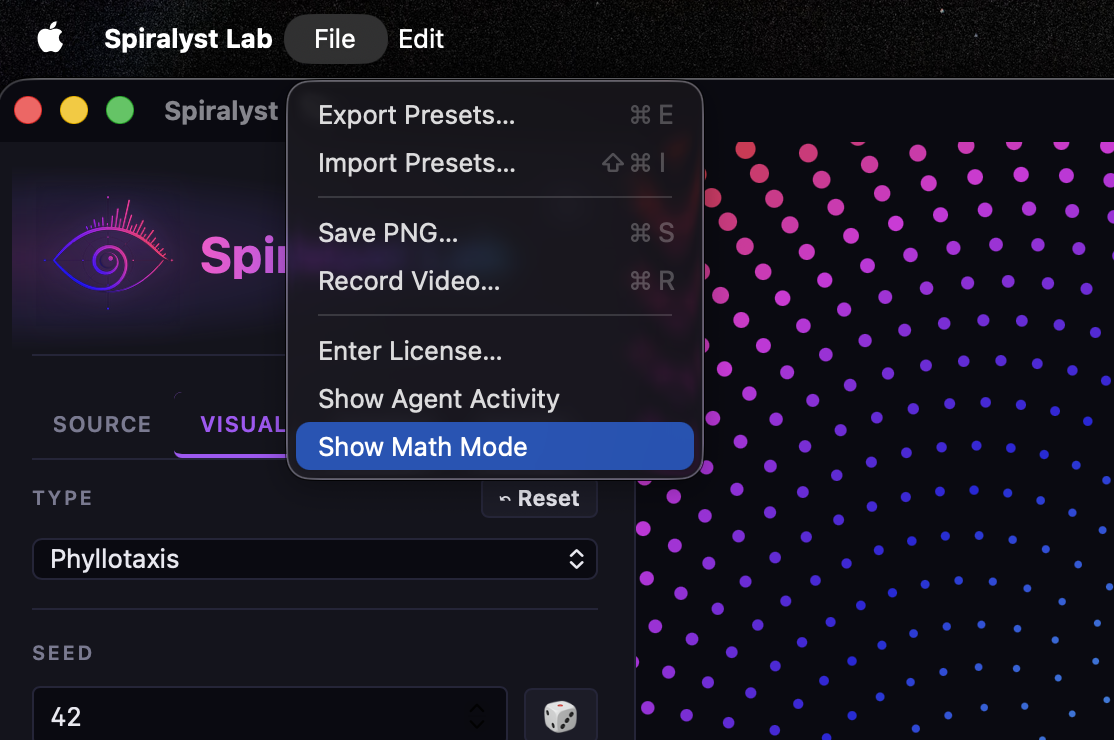
Math Mode is a toggle in the File menu. Turn it on and a tile appears in the corner of the canvas with:
- The formula, typeset the way a textbook would set it.
- The evaluated form underneath, with your current slider values substituted in — and it updates as you move the sliders. The equation on screen always matches the picture on screen.
- A row per symbol: the glyph, its plain-English name, and its current
value. So
Nis also "Arms," and right now it's 5. - Read more, which opens a full explainer over the still-rendering canvas: a short summary, three plain-language paragraphs, the supplementary formulas each with a note saying what it means in everyday words, a paragraph naming which sliders do what, and a "did you know" fact at the bottom.
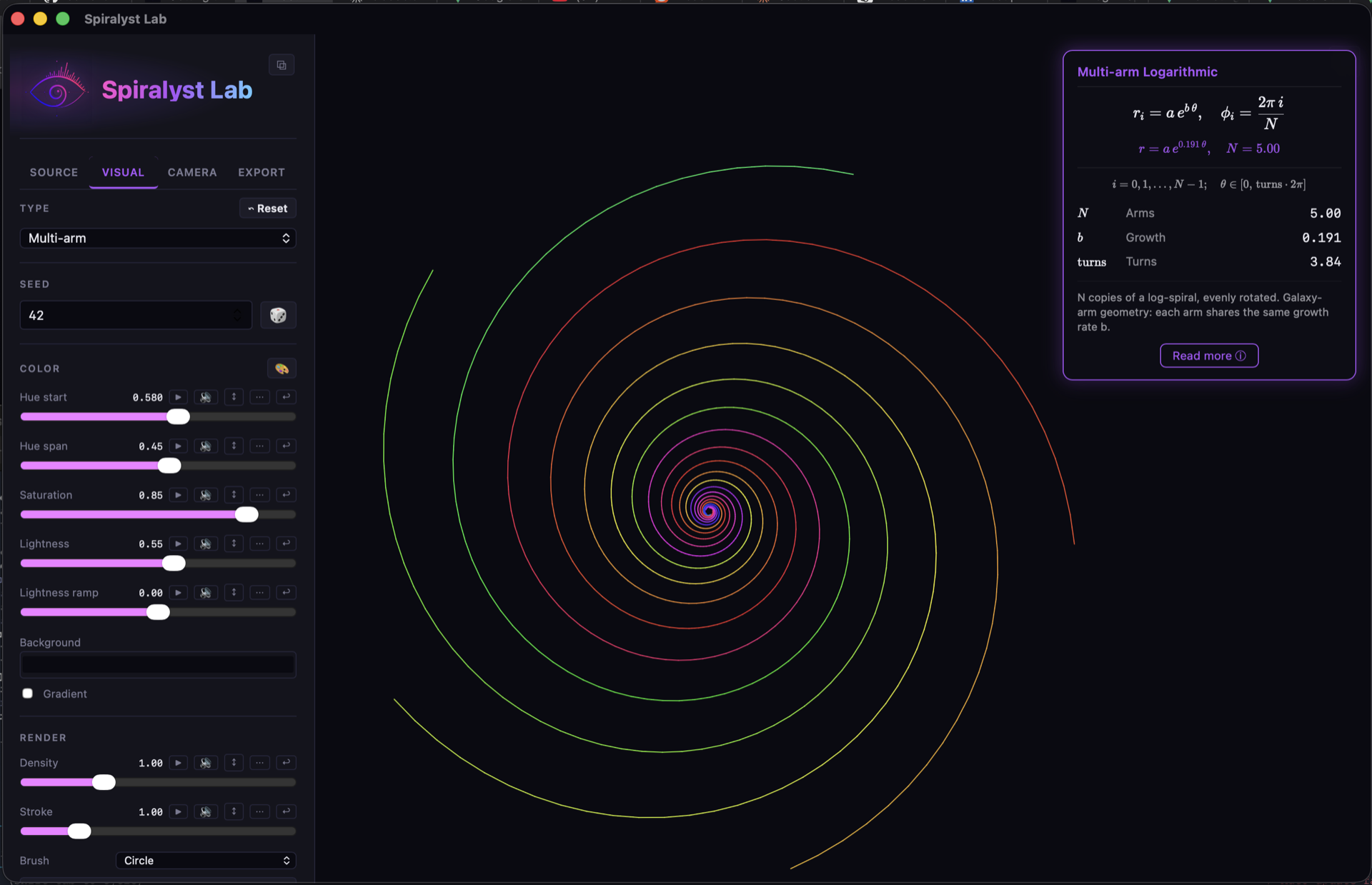
N moves with it — which is the whole pitch: the variable on your board is the
variable on the screen.
Every section can also be read aloud, which matters if you have students who'd rather listen than read, or if you want the room's attention on the projection instead of on a wall of text.
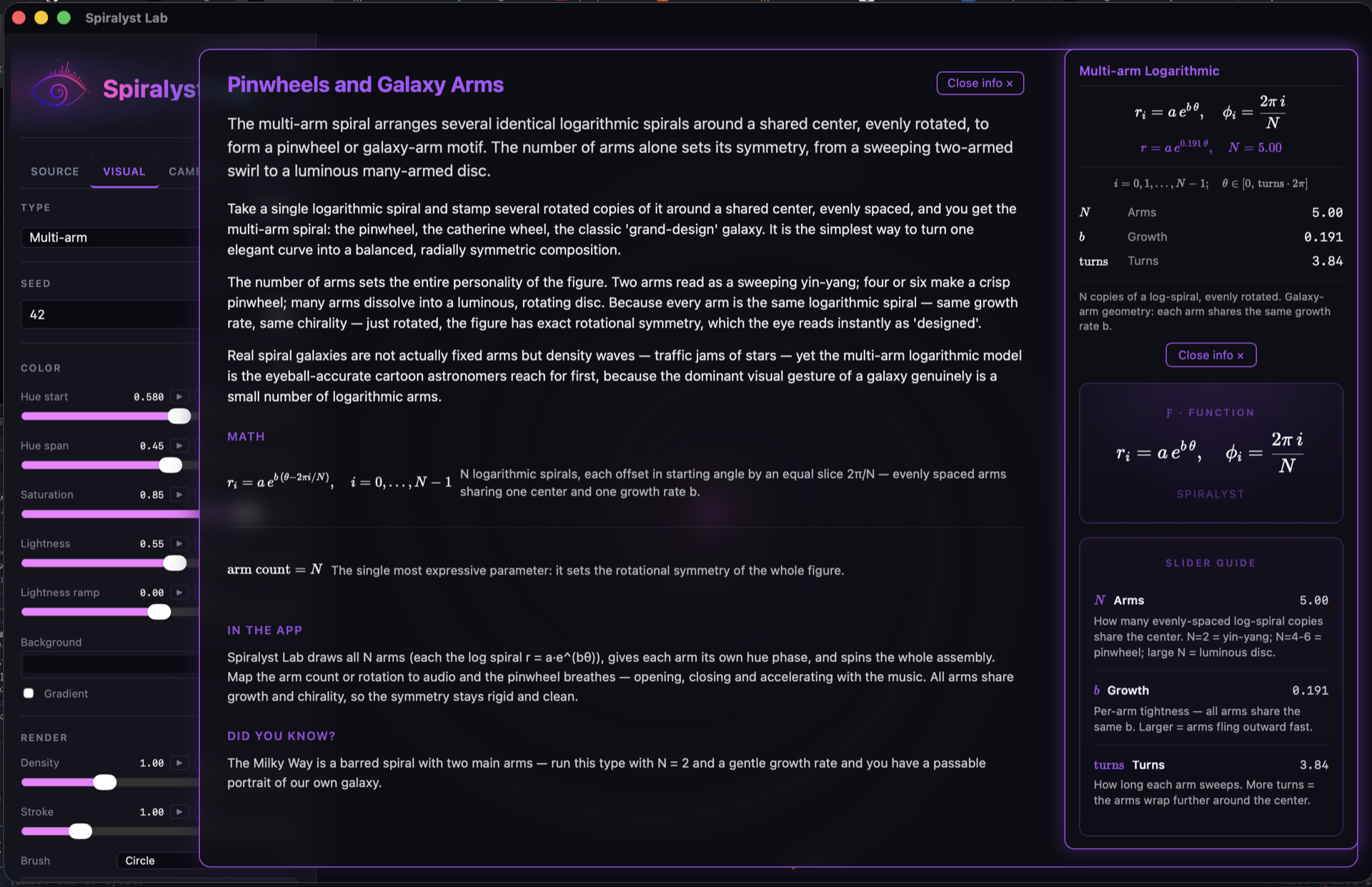
There's a longer walkthrough in the Math Mode release post, and the full feature guide is on the Math Mode page.
The thing teachers seem to like most is the one we didn't expect: you can put a variable on
the board, then move that variable with a slider and let the class watch the shape answer. The
multi-arm logarithmic spiral with N = 2 is a passable portrait of the Milky Way.
Set the growth rate and watch where the arms go.
Some things to do with it
- Elementary. Self-similarity without the word "self-similarity." Zoom into a fractal and ask what they notice. Then zoom again. Ask what they'd expect to see next, then look.
- Middle school. Iteration, coordinates, and what a parameter is. One slider, one variable, one visible consequence — repeated until it's obvious.
- High school. Polar coordinates and logarithmic spirals; complex numbers on the Mandelbrot and Julia sets; the sunflower-head spirals of phyllotaxis sitting right next to the formula that makes them.
- University. Dynamical systems, escape-time algorithms, and — with the Scopes types — Lissajous figures and live spectra from real audio, which turns a signals lecture into something the room can watch happen.
- Music. Play a note and watch it. The Scopes types put a live spectrum on the wall, so a class can see what actually differs between a flute and a clarinet sounding the same pitch. The Lissajous figure draws two frequencies against each other, and the ratio is the interval — a 3:2 closes into a steady loop, and that loop is a perfect fifth. Detune it slightly and watch the figure drift. Frequency bands lets you point different parts of the spectrum at different parts of the picture.
- Art and design. Parameter space as a design space. Students pick a look, then find out they were choosing coefficients the whole time.
Have a browse of the gallery to see what's in there.
What the research says, honestly
We're not going to claim a piece of art software raises test scores. Nobody has studied this app. What we can point to is the broader evidence teachers already work from:
- The National Academies of Sciences, Engineering, and Medicine reviewed the evidence on integrating arts and humanities with STEM subjects and found it associated with higher-order thinking, creative problem solving, mastery of complex content, better communication, and increased motivation and enjoyment of learning. The report is called Branches from the Same Tree — from Einstein's line that the disciplines all grow from one. (It studies higher education specifically, so read it as a case for the approach rather than a promise about any grade band.)
- The National Council of Teachers of Mathematics holds that technology should be used to deepen understanding, stimulate interest in the mathematics being learned, and increase proficiency — with the teacher deciding when and how. See their position statements on strategic use and on equitable integration of technology. That's the right bar, and it's the one we'd like to be measured against: this is a tool you point at something, not a curriculum.
- Fractals are already in classrooms at these ages. One example: an interdisciplinary junior-high proposal running fractal geometry across science, computer science and art lessons at once — which is the STEAM case in miniature. NCTM's Mathematics Teacher has been publishing classroom fractal work for decades, including "Fractal Cards" back in 1998 (members only).
If you've used Spiralyst Lab in a classroom and it did or didn't work, we'd genuinely like to hear which — that's more useful to us than another feature.
The honest logistics
- It's a Mac app. macOS 14.4 or later. If your classroom is Windows or Chromebook, this offer can't help you yet, and we'd rather say so now than after you've emailed.
- One key per teacher, good for one year from issue. Ask again next year and we'll renew it — this isn't a trial that turns into an invoice.
- It's the full app, not a limited edition. Same build everyone else pays $24.99 a year for.
- No accounts and no tracking. There's nothing to sign into and the app doesn't phone home — it runs on the machine in front of you. The privacy page has the details, and if your district needs something specific in writing, email us and we'll write it.
- It's licensed to you, for your teaching. Use it in class, on the projector, in a club, at a science night. It isn't a site license for the whole district — but if that's what you need, ask, and we'll work something out.
How to claim it
Email support@spiralyst.com from your school or university address with:
- Your name and the subject or subjects you teach
- Your school and roughly what ages you teach
- Nothing else — no attachments, no ID
We'll reply with a key and a link to the download. If you've never used it before, Getting Started is ten minutes.
And if you're not a teacher but you know one who'd use this — forward it to them. That's the most useful thing you can do with this post.